
If you thought every new iPhone means buying a whole new device, the iPhone 17e might surprise you.
At first glance, it looks like a small upgrade over the iPhone 16e. But once you go inside the phone, things get interesting—really interesting.
The biggest shock? You might not need to buy the 17e at all to get one of its best upgrades.
A Small Upgrade That Feels Bigger Than It Is
Let’s be honest. The iPhone 17e is not a flashy redesign.
It’s more like Apple quietly fixing the problems people complained about in the iPhone 16e.
The main improvements include:
- MagSafe support finally added
- Faster performance with a new chip
- Better modem with improved efficiency
- Slight storage upgrade without a price jump
But the real story is not just what changed… it’s how Apple changed it.
The MagSafe Fix Everyone Wanted
One of the biggest complaints about the iPhone 16e was simple: no MagSafe.
That meant no magnetic charging, no easy snap-on accessories, and a more “basic” experience.
The iPhone 17e fixes that.
Even better, it turns out the back panel is designed in a way that makes it compatible with the 16e.
So what does that mean in real life?
It means:
- 16e users may be able to upgrade MagSafe without buying a new phone
- A simple back part swap could unlock new features
- Repairs and replacements become easier and cheaper
This is rare in modern smartphones. Most phones are moving toward tighter, harder-to-fix designs. This goes in the opposite direction.
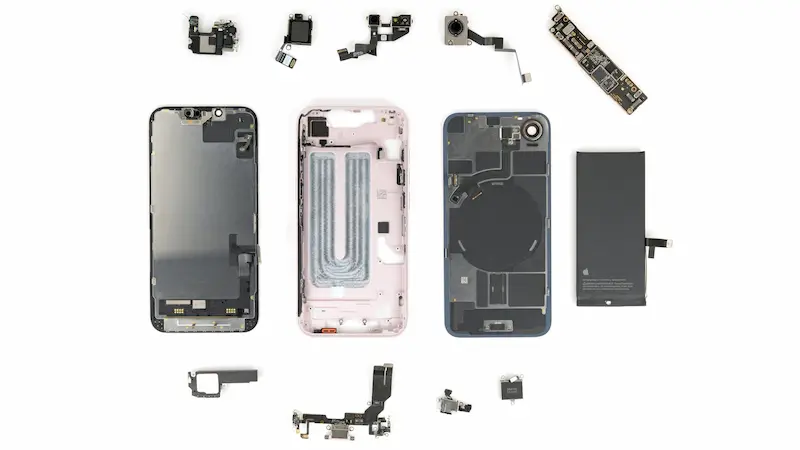
Inside the iPhone 17e: What a Teardown Reveals
When the phone is opened, things look very familiar.
In fact, most of the internal layout is almost identical to the 16e.
A CT scan of the device shows one clear change:
- The new MagSafe assembly
Everything else?
Pretty much unchanged.
That raises an important question:
Is this really a new phone—or just a smarter version of the old one?
A Repair-Friendly Dual Entry Design
One of the best things about the iPhone 17e is how it opens.
Like recent iPhones, it supports a dual-entry design, meaning:
- You can open it from the front (screen)
- Or from the back (glass panel)
Why does this matter?
Because it makes repairs easier.
For example:
- Battery replacement doesn’t require removing the screen first
- Less risk of damaging fragile parts
- Faster and cheaper repair process
Even simple tools like a heat source or hair dryer can help soften the adhesive for opening.
This is a big win for DIY repair users.
Battery Replacement Gets Much Easier
Apple continues using electrically releasing adhesive for batteries.
That sounds complex, but it actually makes life easier for repair technicians.
Here’s how it works:
- A small electric current is applied
- The adhesive releases automatically
- The battery lifts out without force
No prying. No bending. No damage.
The battery itself is also similar to the iPhone 16e, with only minor differences in capacity.
This is one of the clearest areas where Apple is improving repairability instead of making it harder.
Performance Upgrades: A19 Chip and New Modem
Inside, the iPhone 17e gets a new brain.
It features:
- A19 chip for better performance and efficiency
- Apple’s C1X modem for faster and more efficient data usage
Apple claims:
- Up to 2x faster data speeds compared to older modems
- Around 30% lower power consumption
That means:
- Better battery life in daily use
- Smoother performance under load
- More stable connectivity
It’s not a dramatic jump, but it’s a solid one.
The USB-C Problem Nobody Talks About
Now here’s where things get frustrating.
The USB-C port—one of the most likely parts to wear out—is buried deep inside the phone.
To replace it, you need to:
- Remove multiple internal components
- Take out the logic board
- Disconnect delicate ribbon cables
- Access tightly secured screws in hard-to-reach areas
In short, it’s not user-friendly.
This is surprising because Apple has improved repair access in other areas, but not here.
It feels like a step backward in an otherwise repair-positive design.
The Biggest Surprise: Full Parts Compatibility
Now we get to the most interesting part.
Almost everything inside the iPhone 17e is interchangeable with the iPhone 16e.
That means:
- Logic boards can be swapped
- Cameras are compatible
- Internal components mostly match
In real-world testing:
- A 16e logic board worked inside a 17e frame
- The system recognized most parts automatically
Only one major issue appeared:
- Face ID stopped working due to TrueDepth camera mismatch
And MagSafe behavior also depends on software support, not just hardware.
Still, this level of compatibility is rare.
Why This Matters for 16e Owners
This is where things get exciting.
If you own an iPhone 16e, you may not need to upgrade at all.
Because:
- You could potentially add MagSafe via back panel swap
- Many parts are shared between models
- Repair and refurbishment becomes easier
This creates a new kind of upgrade path:
Instead of buying a new phone, you upgrade parts of your existing one.
That’s a big shift.
Final Thoughts: Is the iPhone 17e Worth It?
The iPhone 17e is not a revolutionary phone.
But it is an important one.
It focuses on:
- Repair improvements
- Internal compatibility
- Small but meaningful upgrades
At the same time, it still has flaws:
- USB-C port is hard to repair
- Not all features transfer cleanly between models
- Display still stuck at 60Hz
So what’s the verdict?
The iPhone 17e feels less like a brand-new device… and more like a refined version of the 16e with smarter engineering choices.
And honestly, that might be the point.
FAQ – iPhone 17e Explained
1. What is the biggest upgrade in the iPhone 17e?
The biggest upgrade is MagSafe support and improved internal repair design.
2. Can iPhone 16e users upgrade to MagSafe?
Yes, the back panel appears compatible, allowing potential hardware upgrades.
3. Is the iPhone 17e better than the 16e?
Yes, but only slightly. Most improvements are internal rather than visual.
4. Is the iPhone 17e easy to repair?
Some parts like the battery are easier, but the USB-C port is still difficult to access.
5. What chip does the iPhone 17e use?
It uses Apple’s A19 chip for better performance and efficiency.
6. Should you upgrade to iPhone 17e?
If you already have a 16e, upgrading is not necessary unless you specifically want MagSafe or newer internals.

