
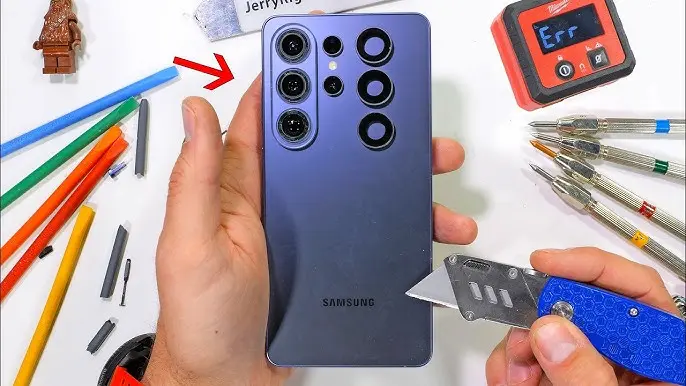
Ever wondered what happens when your expensive phone breaks?
Let’s be honest—most of us love new features. But we rarely ask an important question: can this phone actually be repaired easily?
The Galaxy S26 Ultra brings a flashy new display and some interesting changes. But once you open it up, things get… complicated.
In this breakdown, we’ll explore what’s inside, what’s great, and what might frustrate you later.
The Big Highlight: Flex Magic Pixels Privacy Display
The most exciting feature isn’t the camera or performance.
It’s the new 6.9-inch AMOLED display with “Flex Magic Pixels.”
What does it actually do?
In simple terms, it’s a built-in privacy screen.
- You can toggle privacy mode on/off
- It limits the viewing angle
- Only you (looking straight at the screen) can see content clearly
How it works
Samsung uses a special pixel structure that:
- Restricts light from spreading sideways
- Activates only a subset of pixels in privacy mode
- Boosts brightness to compensate
It’s similar to those privacy screen protectors—but smarter.
Why this matters
- You can hide sensitive content in public
- Works on specific apps or the entire screen
- No need for extra accessories
This is one of the most practical innovations we’ve seen in a while.
S-Pen Changes: A Quiet Downgrade
Not all changes are exciting.
The S-Pen has actually lost some features.
What’s missing?
In older models, you could:
- Take photos remotely
- Control videos
- Use air gestures
Now? That’s gone.
What’s different now?
- Simplified internal design
- Fewer components
- Slight physical redesign
If you loved remote features, this is a step backward.
Opening the Phone: Not So Easy
Getting inside the Galaxy S26 Ultra isn’t simple.
What you need to do
- Heat the back glass
- Use suction tools
- Carefully pry it open
The biggest issue?
👉 You can only access key components from the back.
And that leads to a major problem…
Screen Repair Is a Nightmare
Let’s not sugarcoat this.
Replacing the screen is extremely risky.
Why it’s so difficult
- The display connector is hidden behind the back panel
- The screen is tightly glued
- High heat is required to remove it
Even with tools, the screen can break during removal.
Real-world impact
- Screen repairs become expensive
- DIY repair is risky
- Higher chances of damage
This is one of the biggest weaknesses of the device.
Battery Replacement: Surprisingly Easy
Now for some good news.
Samsung did something right here.
What makes it easy?
- The battery uses a peelable adhesive design
- No complicated tools needed
- Comes out cleanly
Why this matters
- Faster repairs
- Lower repair cost
- Less risk of damage
Honestly, this is one of the best battery designs in modern smartphones.
USB-C Port: A Smart, Modular Design
Charging ports wear out over time. That’s normal.
But Samsung made it easier to deal with.
What’s good here?
- The USB-C port is modular
- Easy to remove and replace
- Not deeply buried inside the phone
Why this is important
- Charging issues are common
- Repairs are cheaper
- Less downtime
This is exactly how phones should be designed.
Camera Setup and Internal Layout
The camera system is powerful—and fairly repairable.
Camera specs include:
- 200MP main camera
- 50MP ultra-wide
- 50MP telephoto (5x zoom)
- 10MP telephoto (3x zoom)
Repair perspective
- Cameras are accessible after removing the mainboard
- Not too difficult to replace
- Requires reapplying thermal paste
Overall, not perfect—but manageable.
A Hidden Problem: Selfie Camera
Here’s something unexpected.
The front camera is heavily glued in place.
Why this matters
- Hard to remove
- Risk of damage during repair
- Requires extra heat and effort
It’s a small part—but a frustrating design choice.
What Samsung Got Right
Let’s give credit where it’s due.
The good parts
- Easy battery removal
- Modular USB-C port
- Accessible camera system
- Back cover without cables (safer to open)
These choices show that Samsung can design repair-friendly components.
Where Samsung Falls Short
Now the not-so-good part.
Major issues
- Screen repair is extremely difficult
- Poor availability of replacement parts
- Confusing and unclear repair listings
- Some components glued too aggressively
The bigger problem
Samsung’s repair ecosystem itself is weak.
- Hard to find parts
- Poor documentation
- Not user-friendly
Even good hardware design can’t fix a bad repair system.
Final Verdict: Is It Repair-Friendly?
The Galaxy S26 Ultra gets a 5 out of 10 for repairability.
Why only average?
- Some parts are easy to fix
- Others (like the screen) are a nightmare
Simple takeaway
- Good for everyday use
- Not great for long-term repairs
Should You Buy It?
If you want:
- A cutting-edge display
- Strong performance
- Premium design
👉 It’s a solid choice.
But if you care about:
- Easy repairs
- Long-term maintenance
👉 You might want to think twice.
FAQs
Is the Galaxy S26 Ultra screen easy to replace?
No, screen replacement is difficult and risky due to strong adhesive and design limitations.
What is Flex Magic Pixels technology?
It’s a built-in privacy feature that limits screen visibility from side angles.
Can I replace the battery easily?
Yes, the battery removal process is simple and user-friendly.
Does the S-Pen still support remote actions?
No, remote features like air gestures have been removed.
Is the USB-C port repairable?
Yes, it’s modular and easy to replace compared to other phones.
What is the repairability score of the S26 Ultra?
It scores 5 out of 10, meaning it’s average in terms of repairability.
Got thoughts on this phone?
Drop a comment below and share this with someone who’s planning to upgrade 📱

