
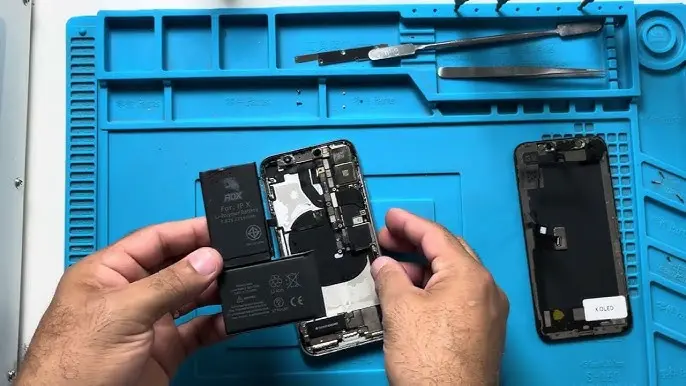
If your iPhone X battery drains fast, shuts down unexpectedly, or battery health has dropped below 80%, it may be time for a replacement. In this complete guide, you’ll learn how to disassemble iPhone X and replace the battery safely at home.
Whether you’re repairing for cost-saving or performance improvement, follow this detailed tutorial carefully.
If you are considering upgrading instead of repairing, check the latest
👉 Apple iPhone X Price in Pakistan:
https://pricetoday.pk/mobile/apple-iphone-x-price-in-pakistan/
You can also explore the complete
👉 Apple iPhone Price List in Pakistan:
https://pricetoday.pk/mobile/apple-iphone-price-in-pakistan/
Tools Required to Disassemble iPhone X
Before starting, prepare the following tools:
- Pentalobe 0.8 mm screwdriver
- Tri-Wing 0.6 mm screwdriver
- Plastic mediator (guitar pick style tool)
- Plastic opening tool
- Tweezers
- Suction cup
- Hairdryer (to soften adhesive)
- Replacement battery
- Waterproof adhesive sealing tape
💡 Tip: Use a magnetic mat to organize screws during removal.
Step 1: Prepare the iPhone X for Disassembly
- Power off the iPhone completely.
- Remove the SIM card tray.
- Unscrew the two Pentalobe screws near the charging port.
Step 2: Heat the Display
Use a hairdryer to heat the screen edges for 1–2 minutes.
This softens the adhesive that seals the display.
⚠️ Do not overheat the screen. Moderate warmth is enough.
Step 3: Open the iPhone X Case
- Attach the suction cup at the bottom of the display.
- Gently pull upward to create a small gap.
- Insert a plastic mediator into the gap.
- Slide around the edges to separate the display.
📌 Important:
The iPhone X opens like a book — open the display to the right side, not upward.
Step 4: Disconnect Battery and Display Cables
- Use a Tri-Wing screwdriver to remove 5 screws securing the metal bracket.
- Remove the metal panel.
- Disconnect the battery cable first.
- Then disconnect the three display cables.
Always disconnect the battery before working on other components.
Step 5: Remove Speaker and Taptic Engine
To access the battery adhesive strips, remove:
Remove the Speaker:
- Unscrew 7 screws
- Remove the metal bracket
- Disconnect the speaker cable
- If glued tightly, gently heat the surface
Remove the Taptic Engine:
- Unscrew the screw between the speaker and Taptic Engine
- Disconnect the cable
- Remove the Taptic Engine carefully
Step 6: Remove the Old Battery
The iPhone X battery is secured with 4 adhesive silicone strips.
- Use tweezers to grab the edge of the adhesive strip.
- Pull slowly and gently.
- Repeat for all 4 strips.
⚠️ Pull carefully — if the strip breaks, apply slight heat or a few drops of isopropyl alcohol under the battery to loosen it.
Once all adhesive strips are removed, lift out the battery safely.
Step 7: Install the New Battery
To install the replacement battery:
- Apply new adhesive strips (usually included with battery)
OR - Use double-sided tape (only on the metal frame)
⚠️ Important:
Do NOT glue the battery on the wireless charging module.
Place the battery correctly and align the connector.
Step 8: Reinstall Components
- Install the Taptic Engine and reconnect cable.
- Reinstall the speaker and secure it.
- Install the metal bracket.
- Secure the 7 screws.
- Reinstall GSM antenna if removed.
Step 9: Test Before Final Assembly
Before sealing the phone:
- Connect the three display cables first.
- Then connect the battery cable.
- Flip the display carefully (do not close fully).
- Power on the device.
Check:
- Touch screen
- Face ID
- Charging
- Speaker
- Camera
If everything works properly, proceed to final assembly.
Step 10: Restore Water Resistance
To restore dust and splash resistance:
- Remove old adhesive from frame.
- Clean edges with medical alcohol.
- Apply new waterproof adhesive tape carefully.
💡 This tape is inexpensive but important if you want to maintain sealing protection.
Step 11: Final Assembly
- Connect display cables.
- Connect battery cable.
- Install metal bracket and screws.
- Press display firmly into the frame.
- Secure the two bottom screws.
- Insert SIM tray.
Now power on your iPhone X and enjoy improved battery performance.
Should You Replace Battery or Upgrade?
If your iPhone X is still running smoothly, replacing the battery is a budget-friendly solution.
However, if you’re considering upgrading to a newer model, check updated market prices here:
👉 https://pricetoday.pk/mobile/apple-iphone-price-in-pakistan/
This helps you compare repair cost vs buying a new device.
FAQ – iPhone X Battery Replacement
How much does iPhone X battery replacement cost in Pakistan?
The cost depends on whether you choose an original or third-party battery. Third-party batteries are cheaper but may not show accurate battery health.
Is it safe to replace iPhone X battery at home?
Yes, if you use proper tools and follow correct steps. However, improper handling can damage internal components.
Why is my iPhone X battery draining fast?
Battery health degradation, background apps, or software issues may cause fast draining. If battery health is below 80%, replacement is recommended.
Does replacing the battery improve performance?
Yes. A new battery improves backup time and prevents unexpected shutdowns.

