
If your Apple Watch Ultra is not charging, showing incorrect heart-rate readings, or has a cracked back cover, the problem is often related to the back cover assembly. This component contains important sensors and the wireless charging coil, which means damage can affect multiple functions at once.
In this step-by-step DIY guide, you’ll learn how to replace the Apple Watch Ultra back cover assembly to fix charging problems, faulty sensors, and physical damage safely.
🔧 Tools Required for Apple Watch Ultra Repair
Before starting, prepare the following tools:
- Pentalobe 1.2mm screwdriver
- Plastic spudgers
- Tweezers
- Screen disassembly tool
- Heat gun or hair dryer
- B7000 adhesive glue
- Screen clamp
Using proper tools helps prevent internal damage during repair.
⚠️ When Should You Replace the Back Cover?
Back cover replacement may solve issues such as:
- Apple Watch Ultra not charging
- Cracked or damaged rear glass
- Heart rate sensor not working
- Temperature sensor malfunction
- Blood oxygen sensor issues
- Incorrect fitness tracking data
The ceramic back assembly includes several sensors and hardware components responsible for health tracking and charging.
🔌 Step 1: Power Off the Apple Watch Ultra
Always turn off the device before beginning repair:
- Power down the watch completely.
- Remove the watch band to make handling easier.
This prevents electrical damage during disassembly.
🔩 Step 2: Remove the Back Cover Screws
- Use a Pentalobe 1.2mm screwdriver.
- Remove the four screws securing the back cover.
⚠️ Important:
Under each screw, there are rubber gaskets responsible for water resistance. Keep them safe for reinstallation.
🔥 Step 3: Heat the Back Cover Adhesive
- Heat the back cover using a hair dryer or heat gun.
- Warm evenly around the edges to soften adhesive.
Heating allows safe separation without cracking internal components.
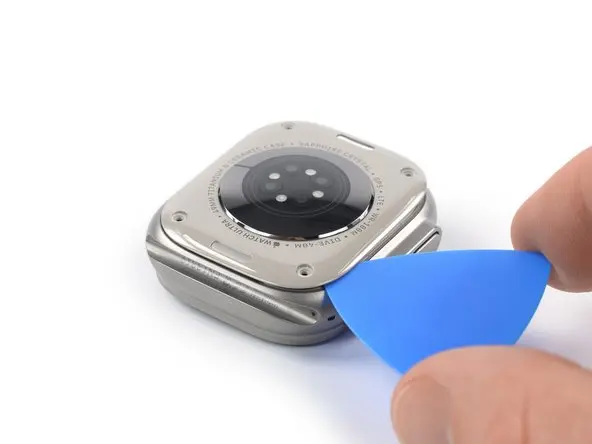
🪛 Step 4: Separate the Back Cover
- Insert a pry tool into the seam between the frame and back cover.
- Slowly slide around the edges to cut adhesive.
- Lift the cover carefully.
⚠️ Do not insert the tool deeply — you may damage the sensor cable.
🔗 Step 5: Disconnect Sensors and Remove Back Cover
After lifting:
- Open the back cover gently like a book.
- Disconnect the sensor cable using a plastic spudger.
- Remove the back cover assembly.
The back cover includes:
- Wireless charging coil
- Heart rate sensor
- Blood oxygen sensor
- Gyroscope
- Accelerometer
- Skin temperature sensor
Replacing this assembly usually restores charging and sensor functionality.
🔄 Step 6: Prepare for Reassembly
During disassembly, the band release buttons and springs may fall out.
Make sure:
- Each button has two springs
- Buttons are aligned correctly
- Mechanism moves smoothly
These tiny parts are essential for band locking.
🧩 Step 7: Install the New Back Cover Assembly
- Align internal cables correctly.
- Connect the main cable manually.
- Ensure the secondary connector aligns automatically during placement.
- Check button movement before sealing.
Proper alignment prevents future hardware issues.
💧 Step 8: Restore Water Resistance
For sealing:
- Apply adhesive silicone pad (recommended), or
- Use B7000 glue if the original adhesive is reusable.
Avoid applying glue near band release button holes.
Drying Time
- Surface drying: up to 45 minutes
- Full curing: 24 hours
⚠️ After repair, factory IP6X water resistance may reduce. Avoid deep-water activities.
✅ Step 9: Test the Apple Watch Ultra
Before glue fully hardens:
- Power on the watch
- Test wireless charging
- Check heart rate sensor
- Verify temperature readings
If everything works correctly, remove excess glue and complete reassembly.
🛠️ Tips to Prevent Future Damage
- Avoid dropping the watch on hard surfaces.
- Clean charging surfaces regularly.
- Remove watch during heavy physical work.
- Use protective cases for outdoor activities.
❓ Frequently Asked Questions (FAQs)
Why is my Apple Watch Ultra not charging?
A damaged back cover assembly or faulty charging coil is a common reason.
Does replacing the back cover fix sensor problems?
Yes, because most sensors are integrated into the back cover module.
Can I keep water resistance after repair?
Partial resistance remains, but factory waterproofing may not fully return.
How long does the repair take?
Typically 45–90 minutes depending on experience.
Is this repair beginner-friendly?
It requires patience and careful handling but can be done with proper tools.


