
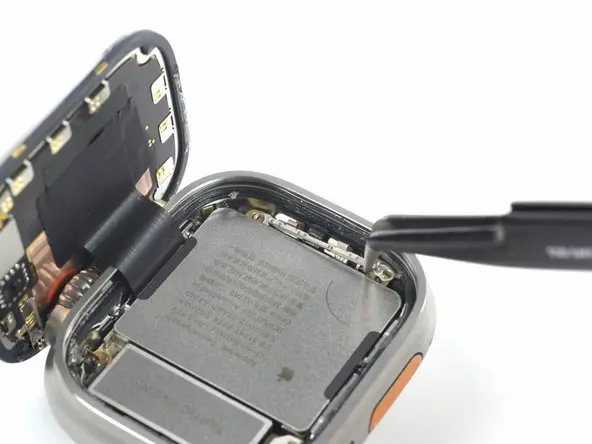
A cracked or broken display on the Apple Watch Ultra can make the device difficult — or even impossible — to use. The good news is that you don’t always need to replace the entire watch. With the right tools and careful steps, you can replace the screen yourself and restore full functionality.
This detailed DIY guide explains how to replace an Apple Watch Ultra screen safely, including disassembly, installation, testing, and restoring water resistance.
🔧 Tools Needed for Apple Watch Ultra Screen Replacement
Before starting the repair, gather the following tools:
- Tri-Wing Y0.8mm screwdriver
- Plastic spudgers
- Tweezers
- Screen disassembly tool
- Heat gun or hair dryer
- B7000 adhesive glue
- Screen clamp
- Magnetic mat (recommended)
A magnetic mat helps organize screws during disassembly so nothing gets lost.
⚠️ Safety Precautions Before Repair
- Power off the Apple Watch completely.
- Wear safety glasses when removing cracked glass.
- Use gloves to protect your hands from sharp edges.
- Apply heat carefully — overheating can damage internal components.
- Avoid inserting tools too deeply inside the watch.
The Apple Watch Ultra has a very tight seal, making screen removal more challenging than other Apple Watch models.
🔌 Step 1: Power Down the Apple Watch Ultra
If the touchscreen still works:
- Turn off the watch normally from settings.
If the screen is unresponsive:
- Press and hold the Side Button + Digital Crown together.
- When the Apple logo appears, release the Digital Crown.
- Keep holding the Side Button until the logo disappears.
This forces the device to power down safely.
🔥 Step 2: Heat the Screen Adhesive
- Use a hair dryer or heat gun for about 2 minutes.
- Recommended heat gun temperature: 170°C.
- Heat evenly around the display edges.
Heating softens the adhesive holding the screen to the frame.
🪛 Step 3: Open the Apple Watch Ultra
- Insert a metal pry tool into the seam opposite the Digital Crown.
- Slowly lift the display.
- Apply steady pressure — do not rush.
If resistance occurs, apply more heat and try again.
💡 Screen Removal Tips
Because the gap is extremely small, patience is essential.
Helpful techniques:
- Apply isopropyl alcohol (91%+) into the gap to loosen adhesive.
- Work around all edges gradually.
- Reheat when necessary.
- Modify the screen disassembly tool slightly if it doesn’t fit properly.
⚠️ Avoid excessive force to prevent antenna damage.
🔋 Step 4: Disconnect Internal Components
After lifting the screen carefully:
- Remove screws securing the metal connector bracket.
- Disconnect the battery using a plastic spudger.
- Unscrew the vibration motor.
- Remove the battery.
- Unscrew the display cable bracket.
- Disconnect the display cable.
You can now safely remove the damaged screen.
🖥️ Step 5: Install the New Apple Watch Ultra Screen
- Place the replacement screen in position.
- Reconnect the display cable.
- Reinstall brackets and screws.
- Temporarily power on the watch to test the display.
Check for:
- Touch responsiveness
- Proper brightness
- No display flickering
If everything works correctly, continue to sealing the device.
💧 Step 6: Restore Water Resistance
Before sealing:
- Remove old adhesive residue.
- Clean the frame using isopropyl alcohol.
- Apply B7000 glue evenly around the housing.
- Carefully align and press the screen into place.
Drying Time
- Surface drying: 3 minutes
- Recommended waiting time: 45 minutes
- Full curing time: 24 hours
⚠️ After repair, the watch may not fully retain its original IP6X water-resistance rating. Avoid deep water exposure.
✅ Final Check
Once the glue sets:
- Turn on the Apple Watch Ultra.
- Test touch response and display quality.
- Confirm buttons and sensors work correctly.
Your screen replacement is now complete.
🛠️ Tips to Prevent Future Screen Damage
- Use a protective screen guard.
- Avoid impacts during workouts or outdoor activities.
- Remove the watch during heavy mechanical work.
- Use rugged protective cases for extreme environments.
❓ Frequently Asked Questions (FAQs)
Is Apple Watch Ultra screen replacement difficult?
Yes, it is considered an advanced repair due to strong adhesive and limited internal space.
Can I replace the screen without removing the battery?
No. Disconnecting the battery is necessary for safety.
Will water resistance remain after repair?
Partial resistance remains, but factory waterproof sealing may not fully return.
How long does screen replacement take?
Usually between 60–120 minutes depending on experience.
Can heating damage the Apple Watch?
Only if excessive heat is used. Keep temperature around 170°C.


