If your Apple Watch Series 9 screen is cracked, unresponsive, or damaged, replacing the display can restore full functionality without buying a new smartwatch. While the repair requires patience and proper tools, it can be completed safely at home by following the correct steps.
This guide explains how to replace the Apple Watch Series 9 screen step by step, including preparation, safe disassembly, installation, and sealing tips.
Tools & Materials Needed
Before starting the repair, gather the following tools:
- Plastic pry tools
- Tweezers
- Screen disassembly tool
- Screen clamp or rubber bands
- B7000 glue (recommended adhesive)
- Isopropyl alcohol (91% or higher)
- Replacement Apple Watch Series 9 display
Why Use B7000 Glue?
B7000 adhesive is commonly used in electronics repair because it offers:
- High elasticity
- Anti-vibration protection
- Strong bonding strength
- Better dust resistance compared to standard adhesive stickers
Step 1: Power Off the Apple Watch & Remove Bands
First, turn off your Apple Watch and remove the watch bands.
If the Touchscreen Is Broken
If you cannot power off normally:
- Press and hold the side button + Digital Crown together.
- Keep holding while the watch restarts.
- When the Apple logo appears, release the Digital Crown but continue holding the side button.
- Release once the logo disappears.
This forces shutdown safely before repair.
Step 2: Heat the Display
Apple Watch screens are sealed tightly with adhesive.
- Warm the display using a hair dryer for about 1 minute.
- Heat softens adhesive and reduces the risk of cracking internal components.
⚠️ Do not overheat the device.
Step 3: Open the Damaged Screen Safely
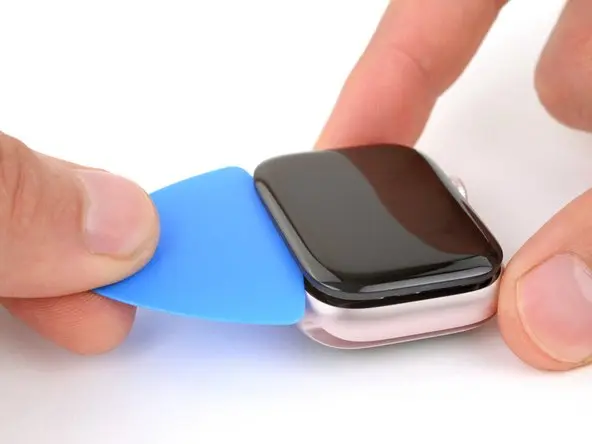
- Insert a curved blade or opening tool into the small gap between the display and watch case.
- Slowly work around all edges.
- Carefully lift the display toward the watch crown side.
👉 If the screen is cracked, wear eye protection to avoid injury from glass fragments.
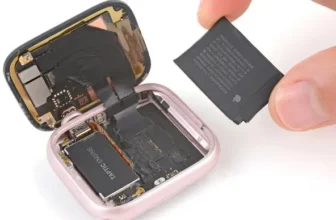
Step 4: Disconnect Display Ribbon Cables
Once the display is lifted:
- Use tweezers to peel back ribbon cable coverings.
- Unlock connectors using a plastic tool.
- Carefully pull ribbon cables out of their sockets.
Handle cables gently to prevent tearing.
Step 5: Remove the Broken Screen
After disconnecting cables, remove the damaged display completely.
Make sure the replacement screen is fully compatible with Apple Watch Series 9 before installation.
Step 6: Install the Replacement Screen
Now connect the new display:
- Insert ribbon cables into their connectors.
- Lock connectors using a plastic tool.
- Reapply protective black tape over cables.
Proper alignment is important for touchscreen responsiveness.
Step 7: Test the New Display
Before sealing the watch:
- Power on the Apple Watch.
- Check touchscreen response.
- Confirm brightness and display functionality.
Testing first prevents reopening the device later.
Step 8: Clean the Adhesive Surface
For strong sealing:
- Use isopropyl alcohol and a cotton swab.
- Remove all old adhesive residue.
- Allow the surface to dry completely.
Clean preparation improves durability.
Step 9: Apply Adhesive and Seal the Screen
Apply either:
- Adhesive gasket, or
- B7000 silicone glue (recommended)
Place glue evenly around the edges and reposition the display carefully.
⚠️ Important: Repair sealing does not fully restore factory waterproofing. Avoid water exposure afterward.
Step 10: Clamp and Allow Glue to Cure
To secure the screen:
- Use screen clamps or rubber bands.
- Leave pressure applied while adhesive cures.
Cure Time Guidelines
- Surface dry: ~6 minutes
- Safe handling: 45 minutes
- Full cure: 24 hours
Keep the watch clamped during the full curing period for best results.
Final Cleaning & Inspection
After 45 minutes:
- Remove excess glue carefully.
- Inspect display alignment.
- Ensure edges are sealed evenly.
Your Apple Watch Series 9 screen replacement is now complete.
Should You Repair or Replace Your Smartwatch?
Screen replacement is usually cheaper than buying a new device. However, if your watch has multiple hardware issues, comparing newer smartwatch options may be worthwhile.
You can check latest smartwatch prices and comparisons in Pakistan on PriceToday to decide whether repair or upgrade is the better option.
FAQs — Apple Watch Series 9 Screen Replacement
Can I replace the Apple Watch Series 9 screen at home?
Yes, with proper tools and careful handling, the repair can be completed DIY.
Is heating the screen necessary?
Yes. Heating softens adhesive and makes opening safer.
Will the watch remain waterproof after repair?
No DIY repair guarantees original water resistance.
How long does screen replacement take?
The repair takes about 45–60 minutes, plus 24 hours curing time.
Why test the screen before sealing?
Testing ensures connectors are installed correctly and avoids reopening the watch.
Final Thoughts
Replacing a damaged Apple Watch Series 9 screen is a practical way to extend the life of your device. With patience, correct tools, and careful sealing, you can restore full usability while saving repair costs.
DIY repairs not only reduce expenses but also help you gain valuable technical skills along the way.