If the speaker on your Apple Watch Series 9 is not working, produces distorted sound, or you can’t hear calls and notifications clearly, the issue is usually caused by a damaged or faulty speaker module.
In this step-by-step repair guide, you’ll learn how to replace the Apple Watch Series 9 speaker and restore clear audio performance without replacing the entire device.
🔧 Tools Required for Apple Watch Series 9 Speaker Repair
Before starting the repair, gather the following tools:
- Tri-Wing Y0.8mm screwdriver
- Plastic pry tools
- Tweezers
- Screen disassembly tool
- B7000 adhesive glue
- Screen clamp or rubber bands
- Magnetic repair mat (recommended)
Using a magnetic mat helps keep screws organized and prevents losing tiny components during reassembly.
⚠️ Signs Your Apple Watch Speaker Needs Replacement
You may need to replace the speaker if you notice:
- No sound during calls or notifications
- Distorted or crackling audio
- Very low volume output
- Siri responses not audible
- Media playback sounds muffled
A speaker replacement usually resolves these issues completely.
🔌 Step 1: Power Off the Watch
- Turn off your Apple Watch Series 9.
- Remove the watch bands to make handling easier.
Always disconnect power before opening electronic devices.
🔥 Step 2: Heat the Display
The Apple Watch display is sealed with strong adhesive.
- Warm the screen using a hair dryer for about 1 minute.
- Apply heat evenly around the edges.
This softens adhesive and makes opening safer.
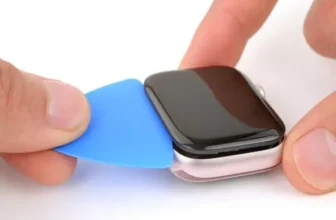
🪛 Step 3: Separate the Display
- Insert a thin blade or opening tool into the gap between the display and frame.
- Slowly move around the edges to loosen adhesive.
- Carefully lift the screen and flip it toward the crown side.
⚠️ Avoid pulling hard to prevent ribbon cable damage.
🔗 Step 4: Disconnect the Display Cables
- Peel protective tape carefully.
- Unlock display connectors using a plastic tool.
- Gently remove ribbon cables.
Set the display aside in a safe place.
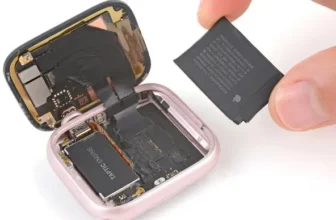
🔋 Step 5: Remove the Battery
The battery is glued to the housing:
- Apply a small amount of isopropyl alcohol underneath.
- Wait a few seconds for adhesive to loosen.
- Carefully pry out the battery.
- Lift the connector latch and disconnect the cable.
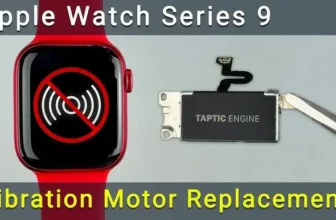
⚙️ Step 6: Remove the Vibration Motor
Before accessing the speaker:
- Unscrew the vibration motor.
- Disconnect its cable from the mainboard.
- Remove the motor carefully.
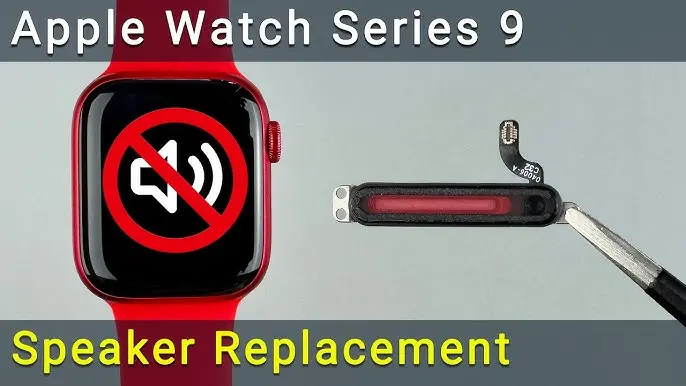
🔊 Step 7: Remove the Faulty Speaker
- Unscrew the three screws securing the speaker.
- Lift the speaker module from the housing.
A damaged speaker is the main reason for sound problems in Apple Watch devices.
🔄 Step 8: Install the New Speaker
- Place the replacement speaker into position.
- Secure it with screws.
- Reconnect the vibration motor and tighten screws.
Ensure all connectors sit properly before moving forward.
🔌 Step 9: Reconnect Battery and Display
- Insert display ribbon cables back into connectors.
- Reconnect the battery cable.
- Reuse original adhesive or apply double-sided adhesive tape if needed.
Power on the watch to test audio before sealing.
🧪 Step 10: Test the Speaker
Turn on the Apple Watch and check:
- Notification sounds
- Call audio
- Siri voice output
- Media playback clarity
If sound is clear, continue with sealing the device.
💧 Step 11: Restore Water Resistance
- Clean old adhesive using isopropyl alcohol.
- Apply adhesive gasket or B7000 glue around the frame.
⚠️ After repair, water resistance may not be fully restored. Avoid swimming or deep water exposure.
🧷 Step 12: Clamp and Allow Adhesive to Cure
- Use screen clamps or rubber bands.
- Surface drying time: about 6 minutes
- Safe handling: after 45 minutes
- Full curing: 24 hours
Remove excess glue once partially dried.
✅ Final Check
After reassembly:
- Confirm speaker sound quality
- Check vibration and display response
- Ensure screen sits evenly
Your Apple Watch Series 9 speaker replacement is now complete.
🛠️ Tips to Prevent Future Speaker Issues
- Avoid exposing the watch to excessive moisture.
- Clean speaker grills regularly.
- Avoid drops or heavy impacts.
- Use protective cases during workouts.
❓ Frequently Asked Questions (FAQs)
Why is my Apple Watch Series 9 speaker not working?
Dust, water damage, or a faulty speaker module are the most common causes.
Can I fix distorted sound without replacing the speaker?
Cleaning may help temporarily, but hardware damage usually requires replacement.
Is the Apple Watch waterproof after repair?
Water resistance may decrease after opening the device.
How long does speaker replacement take?
Typically 60–90 minutes for careful DIY repair.
Do I need professional repair experience?
Basic technical skills and patience are enough if you follow instructions carefully.