
If your Apple Watch Ultra battery drains quickly, shuts down unexpectedly, or shows poor battery health, replacing the battery can restore performance and extend the life of your device.
In this detailed guide, you’ll learn how to safely replace the Apple Watch Ultra battery at home, including required tools, precautions, and tips to restore water resistance after repair.
Whether you own the Apple Watch Ultra 1 or Ultra 2, this step-by-step tutorial explains everything in simple terms.
🔋 When Should You Replace Apple Watch Ultra Battery?
Your battery likely needs replacement if you notice:
- Battery Health close to or below 80%
- Fast battery drain
- Watch shutting down randomly
- Slow performance or overheating
- Charging not lasting a full day
Apple considers a battery worn out once its usable capacity drops significantly.
🧰 Tools Required for Apple Watch Ultra Battery Replacement
Before starting, prepare these tools:
- Tri-Wing Y0.8mm screwdriver
- Plastic spudger
- Tweezers
- Screen disassembly tool
- Heat gun or hair dryer
- Isopropyl alcohol (91% or higher)
- B7000 adhesive glue
- Screen clamp
These tools help safely open the watch without damaging internal components.
⚠️ Important Safety Tips Before Starting
- Power OFF the watch completely.
- Work on a clean, static-free surface.
- Avoid inserting tools too deep.
- Apply heat gradually — excessive heat may damage the display.
- Wear protective gloves while prying open the screen.
The Apple Watch Ultra has a very tight seal, making screen removal more difficult than other Apple Watch models.
🔧 Step 1: Open the Apple Watch Ultra Case
- Turn off the Apple Watch.
- Heat the screen for about 2 minutes using a hair dryer or heat gun.
- Recommended temperature: 170°C
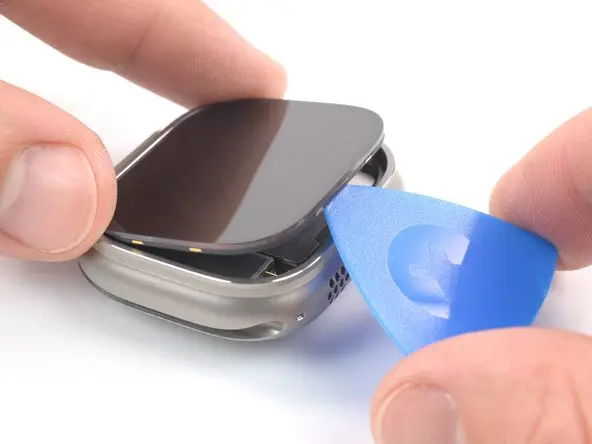
- Insert a pry tool into the seam opposite the Digital Crown.
- Slowly lift the screen while applying steady pressure.
👉 If resistance occurs, reheat the adhesive and try again.
💡 Screen Removal Tips
Opening the Apple Watch Ultra requires patience.
Helpful techniques:
- Apply a small amount of isopropyl alcohol around the edges to loosen adhesive.
- Move gradually around all sides.
- Never force the screen upward suddenly.
- Keep fingers away from the tool edge.
If needed, slightly modify your screen opening tool so it fits the watch frame better.
🔋 Step 2: Remove the Old Battery
After opening the watch:
- Remove the screws holding the metal connector bracket.
- Use a plastic spudger to disconnect the battery connector.
- Unscrew the vibration motor.
- Bend the metal bracket gently using tweezers for access.
- Carefully remove the battery.
🔄 Compatible Apple Watch Ultra Battery Models
Make sure you install the correct battery:
- Apple Watch Ultra (1st Gen): Model A2749
- Apple Watch Ultra (2nd Gen): Model A2956
Installing the correct model ensures proper performance and safety.
🔌 Step 3: Install the New Battery
- Place the new battery inside the housing.
- Reconnect the battery cable.
- Turn on the watch before sealing it to confirm functionality.
If the watch powers on normally, proceed with reassembly.
🔋 Battery Calibration (Important Step)
To maximize battery accuracy:
- Charge to 100%.
- Keep charging for 2 extra hours.
- Use the watch until it shuts off.
- Charge uninterrupted back to 100%.
This process helps the system correctly measure battery capacity.
💧 Step 4: Restore Water Resistance
Before closing the watch:
- Remove old adhesive using isopropyl alcohol.
- Apply B7000 glue evenly around the frame.
- Reattach the screen carefully.
- Use clamps to secure the display.
Drying Time
- Surface drying: 3 minutes
- Recommended wait: 45 minutes before use
- Full curing time: 24 hours
⚠️ After repair, full factory water resistance may not be completely restored. Avoid deep diving or high-speed water sports.
🔋 How to Prevent Future Battery Degradation
Follow these tips to extend battery life:
- Keep battery level between 20%–80%
- Avoid extreme heat or cold
- Use original or certified chargers
- Check Battery Health regularly in settings
✅ Final Result
Once reassembled, your Apple Watch Ultra should:
- Hold charge longer
- Perform smoothly
- Avoid unexpected shutdowns
- Feel like new again
Battery replacement is one of the most effective ways to extend the life of your smartwatch instead of buying a new one.
❓ Frequently Asked Questions (FAQs)
How long does Apple Watch Ultra battery replacement take?
Typically 45–90 minutes, depending on experience and adhesive removal difficulty.
Is it safe to replace Apple Watch Ultra battery at home?
Yes, if proper tools and precautions are used. However, beginners should proceed carefully.
Will water resistance remain after repair?
Partial resistance remains, but original factory IP rating may not fully return.
What battery health percentage requires replacement?
Below 80% battery health is considered worn out.
Can I use a heat gun instead of a hair dryer?
Yes, but keep temperature around 170°C and avoid overheating.


