
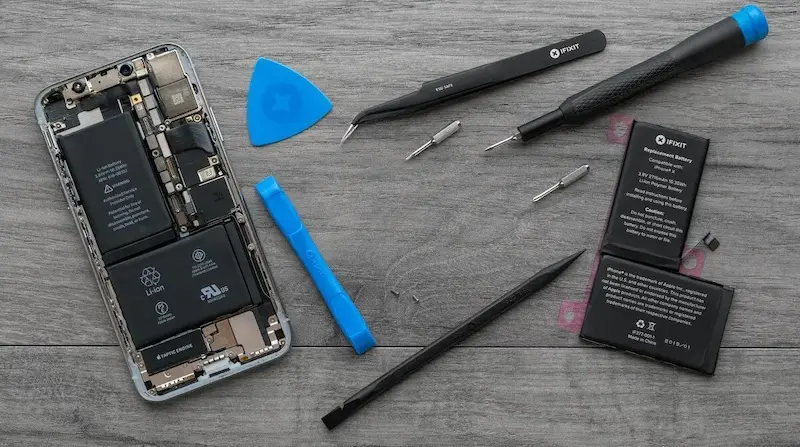
If your iPhone 13 Pro Max is showing fast battery drain or reduced battery health, it’s time for a replacement. This guide will walk you through safely removing the old battery, installing a new one, and restoring your device’s functionality.
Tools Needed for Battery Replacement
Before starting, gather the following:
- Screwdrivers: Pentalobe, Tri-Wing, Phillips, Standoff
- Plastic Pry Tools & Spudger
- Suction Cup
- Tweezers
- Dust & Moisture Resistant Seal
- Adhesive Strips
Pro Tip: Using a magnetic mat helps organize screws during disassembly, making reassembly easier and preventing lost screws.
Preparing Your iPhone for Disassembly
- Power down your iPhone.
- Remove the two Pentalobe screws at the bottom of the phone near the charging port.
- Warm the screen using a heat gun or hair dryer until it is hot to the touch.
- Attach a suction cup to the bottom of the screen and lift slightly.
- Add a few drops of isopropyl alcohol along the edges to soften the adhesive.
- Insert a plastic guitar pick to gradually separate the screen from the chassis.
⚠️ Be extremely careful; iPhone screens are expensive to replace if cracked.
Screen Removal
- Run the plastic pick along all edges except the top, which is clipped in.
- Lift the screen like opening a book and prop it with a mug or stand to free your hands.
- Remove screws securing the shield across the logic board using a Tri-Wing screwdriver.
- Use a plastic spudger to disconnect the battery, screen flex cable, and front sensor cable.
- Carefully remove the screen.
Battery Removal
- Add a few drops of isopropyl alcohol at the top and bottom of the battery to soften adhesive.
- Remove any remaining adhesive seal around the edges using an X-Acto blade.
- Pull the battery tabs slowly using tweezers, wiggling them to avoid snapping.
- Once loose, lift out the battery carefully.
⚠️ Handle battery tabs gently, as they are prone to breaking during removal.
Installing the New Battery
- Remove the blue and pink protective films from the adhesive strips on the new battery.
- Place the battery in the iPhone chassis, aligning the connector with the logic board.
- Press down firmly to ensure it sticks properly.
- Install the dust and moisture resistant seal around the top and sides of the battery.
- Reconnect the battery connector, screen connector, and front sensor cable.
Reinstalling the Screen
- Plug in the screen and sensor connectors carefully.
- Reinstall the shield and secure all Tri-Wing screws.
- Peel back the last layer of the moisture-resistant seal.
- Drop the screen into place, first aligning the top, then clipping the left and right edges.
- Fasten the two Pentalobe screws at the bottom of the phone.
Your iPhone 13 Pro Max is now fully reassembled and ready to power on.
Testing Your iPhone
- Power on the device to ensure all functions are working properly.
- Check that the battery is recognized and charging normally.
Note: The iPhone may display a warning that the battery has been replaced. This does not affect normal use.
FAQ
Q1: How long does battery replacement take?
A: Typically 30–60 minutes depending on experience and tools.
Q2: Can I use a third-party battery?
A: Yes, but your iPhone may show a battery warning. Functionality remains unaffected.
Q3: How do I handle broken battery tabs?
A: Apply isopropyl alcohol underneath the adhesive and gently wiggle with tweezers.
Q4: Will the screen or Face ID be damaged?
A: Carefully separating the screen and using proper tools ensures your screen and Face ID remain safe.

