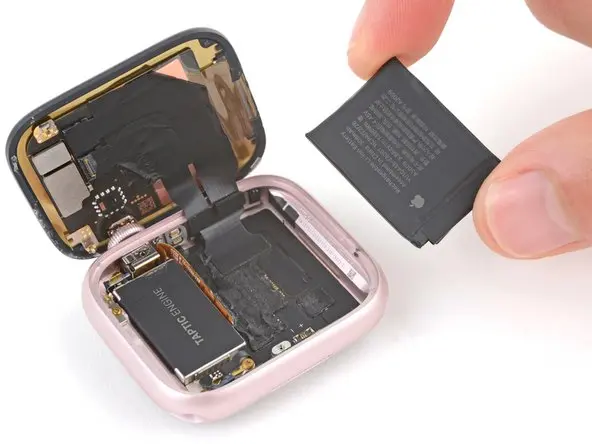
If your Apple Watch Series 9 battery drains quickly, shuts down unexpectedly, or battery health has dropped below 80%, replacing the battery can restore performance and extend the life of your smartwatch.
In this detailed DIY guide, you’ll learn how to replace the Apple Watch Series 9 battery step by step, including required tools, safety tips, and proper reassembly methods.
Whether you own the 41mm or 45mm model, this tutorial will help you complete the repair safely at home.
Why Apple Watch Series 9 Battery Needs Replacement
Over time, lithium-ion batteries naturally degrade. After hundreds of charging cycles, you may notice:
- Fast battery drain
- Watch overheating during use
- Slow charging performance
- Unexpected shutdowns
- Battery health below 80%
If you’re experiencing these issues, battery replacement is usually the most effective solution instead of buying a new watch.
👉 You can also explore smartwatch price comparisons and alternatives on PriceToday’s tech section for upgrade options.
Tools Required for Apple Watch Series 9 Battery Replacement
Before starting, prepare the following tools:
- Plastic pry tools
- Tweezers
- Screen disassembly tool
- Screen clamp or rubber bands
- Isopropyl alcohol
- B7000 glue (recommended)
- Replacement battery
Compatible Battery Models
- A2954 — Apple Watch Series 9 (41mm)
- A3009 — Apple Watch Series 9 (45mm)
Using the correct battery model is essential for proper performance and safety.
Step 1: Power Off the Watch & Remove Bands
Before opening the device:
- Turn off your Apple Watch completely.
- Remove both watch bands.
- Clean your workspace and ensure proper lighting.
This prevents accidental damage during repair.
Step 2: Heat the Display
Apple Watch displays are sealed tightly with adhesive.
- Use a hair dryer to warm the display for about 1 minute.
- Heating softens adhesive and makes opening safer.
⚠️ Avoid overheating to prevent screen damage.
Step 3: Open the Apple Watch Display
- Insert a thin curved blade or opening tool into the small gap between the screen and watch case.
- Slowly move around all edges.
- Carefully lift the display toward the watch crown side.
Take your time — rushing can damage display cables.
Step 4: Remove the Old Battery
The battery is glued inside the watch body.
- Apply a few drops of isopropyl alcohol under the battery.
- Wait a few seconds for adhesive to loosen.
- Use a plastic pry tool to gently lift the battery.
Never use metal tools directly on the battery.
Step 5: Disconnect Battery Connector
- Lift the small locking flap using a spudger.
- Use tweezers to pull the battery cable straight out.
Avoid bending the connector pins.
Step 6: Install the New Battery
Now install the replacement battery:
- Insert the battery cable into the socket.
- Secure the locking flap.
- Position the battery correctly inside the housing.
Ensure cables are not pinched.
Step 7: Test Before Reassembly
Before sealing the watch:
- Power on the Apple Watch.
- Confirm charging works properly.
- Check that the device boots normally.
Testing first saves time if adjustments are needed.
Step 8: Clean Adhesive Residue
Use:
- Isopropyl alcohol
- Cotton swab
Remove old adhesive completely to ensure a strong seal.
Step 9: Glue and Reattach Display
For best results:
- Apply B7000 glue around the edges.
- Carefully place the display back.
- Use screen clamps or rubber bands to hold pressure.
⚠️ Note: After repair, full waterproofing cannot be guaranteed.
Avoid submerging the watch in water.
Step 10: Allow Proper Cure Time
- Surface dry: about 6 minutes
- Safe handling time: 45 minutes
- Full curing: 24 hours
Keep the watch clamped during curing for the best seal.
Important Safety Tips
- Work slowly and gently.
- Avoid puncturing the battery.
- Use plastic tools whenever possible.
- Keep liquids away from internal components.
If unsure, professional repair is recommended.
Should You Replace or Upgrade Your Apple Watch?
Battery replacement is cost-effective if your device still performs well. However, if you’re considering an upgrade, you can compare the latest smartwatch prices in Pakistan on PriceToday before deciding.
FAQs — Apple Watch Series 9 Battery Replacement
How do I know my Apple Watch battery needs replacement?
If battery health drops below 80% or drains unusually fast, replacement is recommended.
Is Apple Watch Series 9 battery replacement difficult?
It requires patience and proper tools but can be done at home with careful handling.
Will my Apple Watch remain waterproof after repair?
No repair guarantees original waterproof sealing. Avoid water exposure afterward.
How long does battery replacement take?
The repair itself takes about 30–60 minutes, but glue curing requires 24 hours.
Can I reuse existing adhesive?
Yes, if still sticky. Otherwise, use new adhesive or B7000 glue.
Final Thoughts
Replacing the Apple Watch Series 9 battery is a practical way to extend your device’s lifespan and restore daily usability. With the right tools and careful steps, you can successfully complete this repair at home.
DIY repairs not only save money but also help you better understand your devices — turning every tech problem into a learning opportunity.