
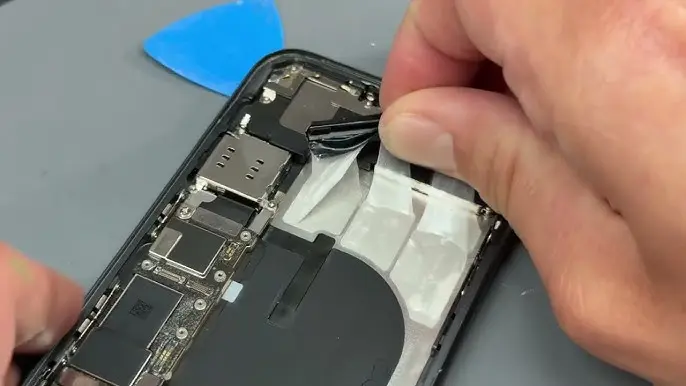
If your iPhone 11 Pro Max battery health has dropped significantly or your phone drains quickly, replacing the battery can restore performance and backup time. In this detailed guide, you’ll learn how to replace the iPhone 11 Pro Max battery safely, including required tools, adhesive removal tips, and water resistance restoration.
If you’re comparing repair cost vs upgrading, you can also check the latest
iPhone 11 Pro Max Price in Pakistan:
https://pricetoday.pk/mobile/apple-iphone-11-pro-max-price-in-pakistan/
Tools Needed for iPhone 11 Pro Max Battery Replacement
Before starting, prepare these tools:
- 0.8mm Pentalobe screwdriver
- Phillips screwdriver
- 1.5mm Standoff screwdriver
- Plastic opening tool
- Plastic mediator (guitar pick style)
- Suction cup
- Tweezers
- Hair dryer (for heating adhesive)
- Isopropyl alcohol (90%+)
- New battery adhesive (silicone strips)
- New screen waterproof adhesive
You can usually find these tools in professional mobile repair kits.
Step 1: Turn Off Your iPhone
Always power off your iPhone before opening it to prevent short circuits or internal damage.
Step 2: Remove Bottom Screws
Using a 0.8mm pentalobe screwdriver, remove the two screws located near the Lightning port.
Step 3: Heat the Display to Soften Adhesive
Use a hair dryer to heat the edges of the display for 1–2 minutes at 60–70°C.
This softens the adhesive and makes it easier to open the device.
⚠️ Do not overheat the display.
Step 4: Open the iPhone 11 Pro Max
- Attach the suction cup at the bottom of the screen.
- Gently pull until a small gap appears.
- Insert a plastic mediator (opening tool) and slide around the edges.
⚠️ Important:
At the top of the phone, do not insert the tool too deeply to avoid damaging the Face ID module.
The phone opens like a book — with the display folding to the right.
Step 5: Disconnect Battery and Display
- Remove 2 screws from the small metal shield.
- Remove 6 screws from the larger shield.
- Disconnect the battery cable first.
- Then disconnect the 3 display cables.
Always follow this order to avoid short circuits.
Step 6: Remove the Taptic Engine
One adhesive strip is located near the Taptic Engine, so it must be removed.
- Remove 4 screws from its metal cover.
- Disconnect the secondary battery cable.
- Disconnect the Taptic Engine cable.
- Remove 2 Phillips screws and 1 standoff screw.
- Lift out the Taptic Engine.
Step 7: Remove Old Battery Adhesive Strips
The iPhone 11 Pro Max battery is held by 3 silicone adhesive strips.
- Use tweezers to peel off each strip slowly.
- Pull steadily and avoid snapping the adhesive.
If Adhesive Tears:
You have two options:
- Add a few drops of isopropyl alcohol under the battery
OR - Apply gentle heat with a hair dryer
Then carefully pry from the side without adhesive.
The battery should come out safely without bending.
Step 8: Install the New Battery
- Apply new adhesive sticker evenly to the battery.
- Press firmly to ensure proper bonding.
- Place the battery carefully into the housing.
Make sure it sits flat and aligned properly.
Step 9: Test Before Final Assembly
Before sealing the phone:
- Connect the 3 display cables first.
- Then connect the battery cable.
Power on the phone and check:
- Display working
- Touch functioning
- Face ID working
- Charging working
If everything works fine, proceed to final assembly.
Step 10: Restore Water and Dust Resistance
Battery replacement requires new waterproof adhesive.
- Remove old adhesive from frame.
- Clean edges using isopropyl alcohol and cotton swab.
- Apply new silicone adhesive carefully.
- Press firmly so it sticks well.
⚠️ Important:
This restores basic water and dust resistance but does NOT make the iPhone 100% waterproof.
Step 11: Final Assembly
- Connect display cables (first).
- Connect battery cable (second).
- Install metal shields and screws.
- Close display carefully.
- Reinstall the two bottom screws.
Now turn on your iPhone 11 Pro Max.
Should You Replace the Battery or Upgrade?
If your device is still performing well, battery replacement is much cheaper than buying a new iPhone.
However, if you’re considering upgrading, you can compare:
- Latest Apple mobile prices in Pakistan
https://pricetoday.pk/mobile/apple-iphone-price-in-pakistan/
This helps you decide whether repair or replacement is more cost-effective.
FAQ – iPhone 11 Pro Max Battery Replacement
How much does it cost to replace iPhone 11 Pro Max battery in Pakistan?
Battery replacement cost depends on whether you use a genuine or third-party battery. Genuine batteries are more expensive but safer and more reliable.
Can I replace iPhone 11 Pro Max battery at home?
Yes, but it requires proper tools and technical skills. Incorrect repair may damage Face ID, display, or internal components.
Does replacing the battery improve performance?
Yes. If your battery health is below 80%, replacing it can improve battery life and prevent unexpected shutdowns.
Does battery replacement restore waterproofing?
Only if you install new waterproof adhesive. Even then, it does not guarantee 100% waterproof performance.

