
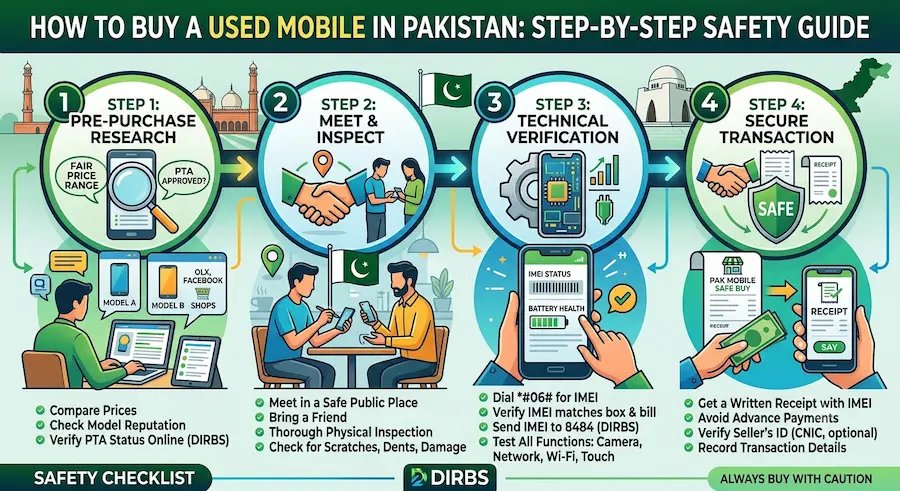
A used phone can get you a flagship-level camera or a smooth gaming experience for half the price of a new unit, but the second-hand mobile market in Pakistan also hides IMEI-blocked, stolen, and tampered devices. Buying safely comes down to following a fixed checklist every single time, no matter how trustworthy the seller sounds. This guide walks through that checklist step by step, from where to look to how to verify PTA status before you hand over any money.
Table of Contents
- Where to Buy a Used Mobile in Pakistan
- Step 1: Set Your Budget and Must-Have Specs
- Step 2: Check PTA Approval and IMEI Status
- Step 3: Physically Inspect the Phone
- Step 4: Match the IMEI on the Box and the Software
- Step 5: Ask for the Original Box, Accessories, and Receipt
- Step 6: Test Every Function Before Paying
- Step 7: Pay and Meet Safely
- Common Used Mobile Scams to Avoid
- Buying Used vs Buying New
- FAQs
- Final Verdict
Where to Buy a Used Mobile in Pakistan
Most buyers in Pakistan look in a handful of places. OLX remains the largest classifieds platform for second-hand phones, with listings from individual sellers across every city. Daraz also carries certified refurbished and used listings from registered sellers, which usually come with a short return window. Facebook Marketplace and local buy-sell groups are popular for quick, nearby deals. For in-person shopping, markets such as Hafeez Centre in Lahore, Rainbow Centre in Karachi, and Mobile Bazaar in Rawalpindi let you compare multiple phones and sellers in one visit, which makes it easier to negotiate and inspect devices side by side.
Step 1: Set Your Budget and Must-Have Specs
Decide your budget before you start browsing listings, and separate it into two parts: the phone price and a buffer for PTA tax if the device turns out to be non-compliant. Write down your non-negotiable specs, such as RAM, storage, and battery health, so you are not swayed by a good price on a phone that does not actually meet your needs.
Step 2: Check PTA Approval and IMEI Status
This is the single most important step, and it should happen before you agree to buy, not after. Every phone has a unique 15-digit IMEI number, and Pakistan Telecommunication Authority’s DIRBS system tracks the registration status of every IMEI used in the country. Ask the seller for the IMEI in advance, or check it yourself once you have the phone in hand.
- Find the IMEI: dial *#06# on the phone to display it instantly, or check the sticker on the original box or SIM tray
- SMS check: send the IMEI number, with no spaces or dashes, to 8484
- DIRBS web portal: enter the IMEI on PTA’s official DIRBS website for a more detailed result
- DVS app: install the Device Verification System app and scan the box barcode or enter the IMEI manually
You will get one of three results. Compliant means the device is fully approved and safe to buy. Non-Compliant means tax has not been paid yet, and the phone may still work for a limited grace period before it gets blocked, at which point you would need to pay the PTA tax yourself to keep it active. Blocked means the device is blacklisted due to theft, smuggling, or IMEI duplication, and you should walk away immediately.
If the phone is a dual-SIM device, it will show two IMEI numbers. Check both separately, since a seller may have only paid tax on one slot while the second remains blocked.
Step 3: Physically Inspect the Phone
Once the IMEI checks out, move on to a hands-on inspection. Check the screen for dead pixels, discoloration, or scratches under bright light. Press every physical button, including volume and power. Check the charging port and headphone jack for corrosion, which is a common sign of past water damage. Look for a battery health reading in the phone’s settings menu, since a battery below 80 percent health will need replacing sooner than you might expect. Check the cameras in different lighting conditions and confirm the fingerprint sensor and Face ID or similar unlock feature work reliably.
Step 4: Match the IMEI on the Box and the Software
Compare the IMEI printed on the phone’s original box or SIM tray with the IMEI shown on screen when you dial *#06#. If the two numbers do not match, the device has likely been tampered with or has a cloned IMEI, and it is at real risk of being blocked later even if it currently shows as compliant. Also confirm that the brand and model shown in the DIRBS or DVS app result actually matches the phone in your hand.
Step 5: Ask for the Original Box, Accessories, and Receipt
A seller who still has the original box, charger, and purchase invoice is generally more trustworthy, and these items also help if you ever need to prove ownership or claim any remaining manufacturer warranty. If the seller cannot produce any purchase proof at all, ask directly how and when they acquired the phone, and be cautious if the story does not add up.
Step 6: Test Every Function Before Paying
Insert a working SIM card and confirm you can make a call, send an SMS, and connect to mobile data. Test Wi-Fi, Bluetooth, GPS, the speaker, and the microphone. Check that the phone charges properly and does not overheat quickly during normal use. Only agree to the final price after every one of these checks is done, not before.
Step 7: Pay and Meet Safely
Meet in a public place such as a mobile market, a bank branch, or a busy café rather than an isolated location. Avoid sending advance payment to someone you have never met, especially for listings found on social media groups. For higher-value phones, consider meeting at a mobile repair shop and paying a small fee to have a technician check the phone’s internals and IMEI status on the spot before you complete the transaction.
Common Used Mobile Scams to Avoid
- Sellers who refuse to let you check the IMEI before payment
- Listings with photos that do not match the seller’s actual stock, often used to lure buyers with a lower price
- Phones with a cloned or reprogrammed IMEI that briefly appears compliant but gets blocked weeks later
- Pressure to pay in advance for a phone to be “delivered” or “reserved”
- Swapped devices during in-person meetings, where the phone shown initially is not the one actually handed over at payment
Buying Used vs Buying New
| Factor | Used Phone | New Phone |
|---|---|---|
| Price | Significantly lower for the same specs | Full retail price |
| Warranty | Usually none, or a short seller-provided guarantee | Full manufacturer warranty |
| PTA risk | Must be verified before purchase | Comes PTA-approved from authorized dealers |
| Battery health | Varies, needs checking | 100 percent at purchase |
| Negotiation | Price is usually flexible | Fixed retail pricing |
FAQs
How do I check if a used phone is PTA approved before buying?
Dial *#06# on the phone to get its IMEI, then send that IMEI number to 8484 by SMS, check it on PTA’s official DIRBS web portal, or scan the box barcode using the DVS app. The result will show as Compliant, Non-Compliant, or Blocked.
What does Non-Compliant mean on a used phone?
Non-Compliant means the device’s tax has not yet been paid to PTA. It may still work for a limited grace period, after which the SIM services will be blocked unless the applicable PTA tax is paid to register it.
Can I still use a blocked phone?
A blocked phone can still connect to Wi-Fi, but it cannot use any local SIM card for calls, SMS, or mobile data on any network. Devices blocked for theft cannot be unblocked unless the original owner verifies and requests the unblock.
Is it safe to buy a used phone from OLX or Facebook Marketplace?
It can be safe as long as you verify the IMEI status before paying, meet in a public place, physically inspect the device, and avoid sending any advance payment to a seller you have not met.
What should I check physically on a used phone?
Check the screen for scratches or dead pixels, test all buttons, inspect the charging port for corrosion, check battery health in settings, and test the cameras, speaker, microphone, and fingerprint or face unlock before paying.
Do I need the original box to buy a used phone safely?
It is not strictly required, but having the original box lets you match the printed IMEI against the phone’s software IMEI, which helps confirm the device has not been cloned or tampered with.
Final Verdict
Buying a used mobile in Pakistan is a smart way to save money, as long as you treat the PTA and IMEI check as a non-negotiable first step rather than an afterthought. Combine that verification with a proper physical inspection, a full functionality test, and a safe in-person meeting, and the risk of ending up with a blocked or damaged phone drops close to zero. Skip any of these steps to save five minutes, and you risk losing the entire amount you paid.


